
 For Boys
 For Girls
 For Kids
 Top Games
 My Games
 Top Games
 My Games


Numberblocks Generator Game Online
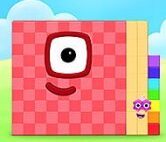
Description
The Number facts panel in Numberblocks Generator reports place value, odd-or-even status, and prime status beside the changing block character. That small addition turns a playful number display into a quick learning tool.
| Type | Educational number visualizer |
| Core action | Change the displayed number and inspect its block character |
| Controls | Menu, plus/minus jumps, page arrows, Set |
| Learning aids | Place value, odd/even status, prime status, breakdown tool |
Changing values in Numberblocks Generator
Press Play and wait for the landscape and the starting value, zero, to appear. Open the three-bar menu to find the plus and minus controls.
The block character updates with the number, so a change in value is visible rather than abstract. Moving from a small value to a much larger one makes the scale of the number easier to grasp, especially for learners who benefit from seeing quantities represented spatially.
For a more targeted question, use Set to enter a value directly. This is useful for checking a number you have met in a worksheet or for testing a guess before looking at the facts panel.
Reading the Number facts panel
The added Number facts panel reports place value, whether the current number is odd or even, and whether it is prime. Those details turn the generator into more than a character-changing toy: a learner can predict a property, change the value, and check the result immediately.
For example, entering 51 shows why a number that looks unfamiliar can still be tested with familiar arithmetic: 51 is divisible by 3 and 17, so it is not prime. This kind of quick verification is useful for students who are learning to distinguish prime numbers from composite ones.
The Break it down button opens the Number Blocks Tool with the current value filled in. A printable practice card can then provide six questions and their answers, giving the activity a natural next step away from the screen.
Learning routines and common snags
A common beginner mistake is pressing controls before the initial landscape has finished loading. The project contains well over a thousand drawings, so the first load can take a little while.
Try a prediction routine: choose a number, guess its place value or parity, and then check the Number facts panel. A learner who likes independent challenges can use Set to test a prime-number claim, while a parent or teacher can ask for a reason before revealing the panel.
The generator is a remix of a Scratch community project, and the added facts panel and breakdown link are useful extensions. One limitation is that the character display is a visual aid rather than a full lesson; learners still need to explain why a number is prime, odd, or even instead of treating the panel as the answer to every question.
Numberblocks Generator questions
How do you jump to a large number?
Open the three-bar menu and use the plus or minus controls to change by 1, 10, 100, and larger steps. The arrows switch between pages of bigger jumps, while Set lets you enter a specific value directly.
What facts does the Number facts panel show?
It displays place value, odd-or-even status, and prime status for the current number. Use it to check a prediction, such as whether 51 is prime, and then explain the result using its factors.
How can you make a practice card?
Choose Break it down to open the Number Blocks Tool with the current number already entered. The tool can print a card containing six questions and their answers, which makes it easy to review the same value after exploring its character.
Numberblocks Generator is most useful when the changing block character leads to a question about place value, factors, or parity. Test a value, check the Number facts panel, and use Break it down to turn a quick look at the number into a more deliberate practice session.

 1














 2705


