
 For Boys
 For Girls
 For Kids
 Top Games
 My Games
 Top Games
 My Games


Swaggerfall Game Online
Description
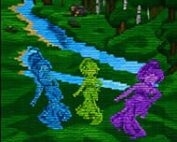
What does a first-person open-world RPG look like when every wall, tree and enemy is drawn with text glyphs? Swaggerfall answers that with colored ASCII cells inside a terminal, and the surprise is how quickly your eyes stop noticing the letters and start reading a landscape.
| Genre | First-person open-world fantasy RPG |
| Look | ASCII graphics with colored backgrounds |
| Combat | Turn-based with quick time events |
| World | Procedurally generated and infinite |
| Platforms | Windows, Linux and browser |
| Status | Open alpha |
Reading the Glyphs: Controls and Look of Swaggerfall
The graphics are limited to what the command line offers, which luckily includes background colors for text glyphs. That is what gives the world its depth, because ground, sky and buildings are separated by color rather than by textures. Early in your first run you will spend a minute just learning to read shapes. Players who grew up on Daggerfall-style procedural worlds will feel at home, since that is the lineage the game openly draws from.
You only need a handful of keys. WASD moves you, the arrow keys look around, Space jumps, E interacts and R eats or drinks. The E key alone carries dozens of meanings depending on context, whether you are chopping, mining, talking or hunting, so the same button does a lot of quiet work.
Tab opens the action menu, which reaches every screen in the game and lists the keybinds next to each one. That is the piece borrowed from Skyrim-style UX: one menu for everything, with the shortcut printed beside it. Players who prefer keys over menus can memorize the binds and skip the menu almost entirely.
Every Action Feeds XP in Swaggerfall
Sprinting, jumping, climbing, mining, smelting, cooking and even eating all grant XP. Leveling here comes from doing things, not only from fighting, and beginners often miss that because they assume combat is the only way forward. A quiet session of mining and smelting will move your skills just as surely as a fight will.
Parkour is where this system shines. The game uses coyote time, so you never fall from a building prematurely when you meant to jump, and the more proficient you become at jumping, the more ledge grab tolerance you get. Once you have leveled that skill, a jump that comes in two pixels short of a roof still catches the edge and lets you continue your run. Movement-focused players will find this the most satisfying part of the progression.
Combat feeds the same loop and adds a twist. Fighting enemies teaches you about their race, which makes later fights easier and opens up new interactions. If you have fought enough of one enemy type, you can tell them to leave you alone. Not everything is smooth here, though, since the proficiencies screen is overloaded with information and the developer lists it among the known issues.
Turn-Based Combat, Quick Time Events and the Shadow Counter
Combat takes its cue from Expedition 33: turn-based, with quick time events layered on top. Space handles the three core timing actions, which are hit, parry and dodge. A perfect parry is the payoff, and learning each enemy group’s rhythm is the real skill in the early hours.
Shadow strikes are the part that trips up newcomers. You counter them with C instead of Space, and the window opens once the bar turns purple. The game only tells you this during the attack itself, and the situation is hectic enough that many new players never notice, so remember it: purple bar, press C.
Timing-focused players will enjoy the rhythm, but the combat has rough edges that players discuss openly. Quick time events sometimes fail even when they seem to land perfectly, possibly because groups of enemies have different timings or because a level-up mid-battle shifts the windows. Feedback on crits and parries is not always clear, and some combat sounds are still procedurally generated blips, especially in ultimates.
Infinite World, Wyrdness and Rumors
The world is infinite and created on the fly by mathematical formulas. The story takes place within a 20 by 20 km area, but you can travel far beyond it if you want. Terrain includes highlands, lowlands, mountain ranges, forest and desert, and you will find large cities, towns and villages scattered across it.
Contract work comes from an innkeeper, so every settlement is a place to pick up your next job. Rumors also spread through the world at a fixed speed as you act, which means a stranger who wiped out an army of minotaurs will eventually be talked about in towns far away. Exploration-first players will like that the world reacts to what you do rather than just sitting there.
Travel has a cost, though. Chaos zones, called wyrdness, appear in the world and boost enemy stats further the more you have traveled from the center of the map. The main quest is also short and generic, which the developer acknowledges, so the strongest reason to keep going is the exploring rather than the story.
Open Alpha Rough Edges and Performance Fixes
This is an open alpha and a vertical slice of what the game will become. Enemy types, skill lines, dialogue, quests and balancing are all bound to change, and save compatibility with future builds is not guaranteed. The writing in dialogue and descriptions needs an overhaul, and the developer says so plainly. In the browser build, saves live in browser storage and can disappear if you clear your data, so open the Pause menu, go to profiles, press C to copy a profile and paste it into a text file, then use V to import it later.
If the game runs laggy, a few steps usually fix it:
- Restore the default graphics settings, which sets quality to high.
- Turn off supersampling, because it needs four times more calculations per cell.
- Lower the tree, node, house and actor render settings, since their cost grows quickly with distance.
- Press F1 to watch frame times while you adjust.
On Windows, running the game inside Windows Terminal improves performance dramatically, and a font size that gives around 15,000 text cells is a good balance between readable text and visible detail. On Linux, inputs can misbehave in several terminals, and kitty is the one recommended for the best results. Even there the controls are not as snappy as on Windows or in the browser, which is worth knowing before you commit.
Swaggerfall is at its best when a near-miss jump catches a roof, the shadow counter lands on a purple bar, and wyrdness reminds you how far from the center of the map you have wandered. It is rough, honest about its unfinished parts, and unlike anything else you will find rendered in a terminal.

 3
3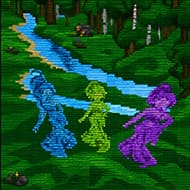
 For Boys
  For Girls























 2680
2680


